
If you spend hours at a computer, the right mouse can change how your wrist and forearm feel by the end of the day. You want something that reduces strain, improves precision and fits the way you work.
This roundup focuses on ergonomics, connectivity and real-world comfort so you can pick a mouse that helps you stay productive and pain-free. Better posture, less discomfort, and a more efficient workflow are within reach when you choose the right ergonomic mouse.
Top Picks
| Category | Product | Price | Score |
|---|---|---|---|
| 🏆 Best For Wrist Relief | Logitech MX Vertical | AED 297.00 | 92/100 |
| 💼 Best For Multi-Device Use | ProtoArc EM11 | AED 62.00 | 84/100 |
| 💰 Best Budget Pick | UGREEN Vertical | AED 63.90 | 80/100 |
| ⭐ Best For Customization | Logitech Lift | AED 189.00 | 89/100 |
How We Picked These Mice
You need a mouse that balances comfort, reliability and the features you actually use. We looked for ergonomic angle and shape that reduce wrist pronation, adjustable DPI for tracking precision, reliable wireless or Bluetooth connectivity, battery life and charging convenience, button customization for workflow shortcuts, and broad OS compatibility so your purchase works across devices. We also considered price and real user feedback so you can choose a model that fits your budget and daily routine.
🏆 Best For Wrist Relief
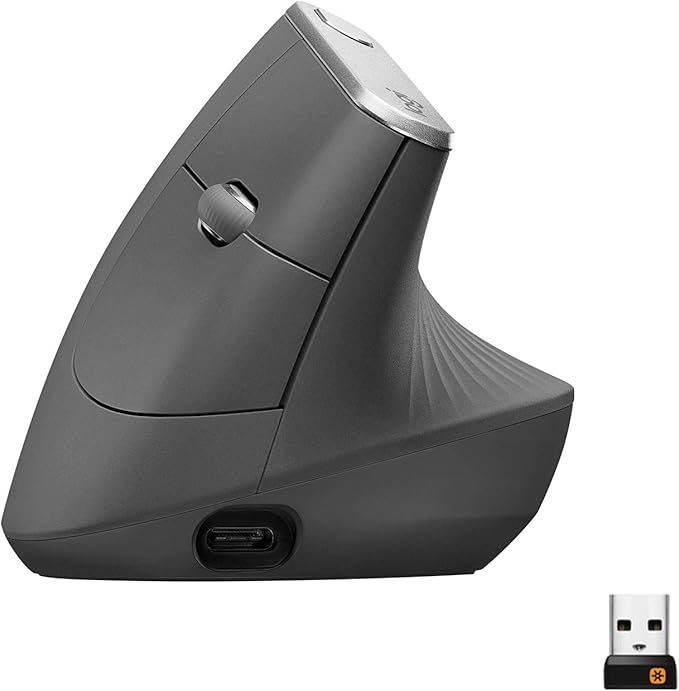
Logitech MX Vertical
If you spend long hours at a desk and your wrist starts sending subtle reminders, this mouse feels like a small, useful upgrade. The 57° handshake angle puts your hand in a more natural position, so your forearm and wrist don’t have to twist as much during the day. It tracks up to 4000 DPI, which means smooth cursor movement whether you’re editing photos or just juggling tabs.
You can pair it with multiple devices via Bluetooth or the 2.4GHz dongle, and the USB‑C fast charging gets you back to work quickly. For daily use it’s a comfortable, durable option; for special occasions like a long editing session or marathon spreadsheet day, it helps keep fatigue down.
If you’re serious about cutting down wrist strain, it’s worth trying.
What People Say
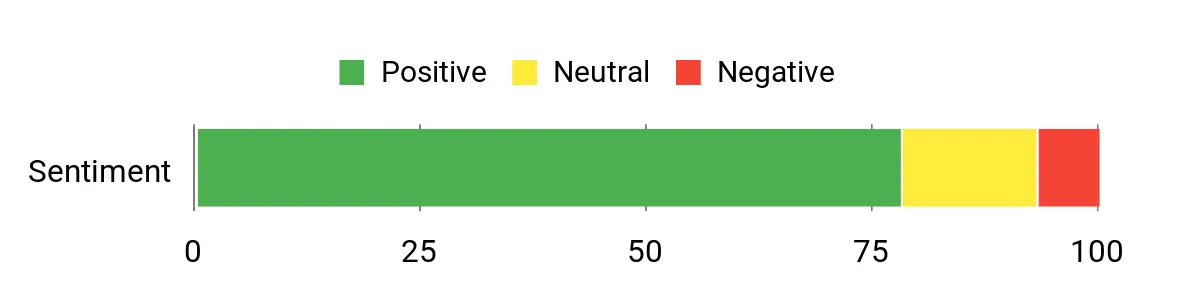
People often mention immediate relief from wrist discomfort after switching, plus praise for the multi-device setup and reliable tracking. A few note a short break-in period as your hand adapts to the vertical angle.
Overall Sentiment: Positive
🗣️ AlexR
Switched to this after months of wrist soreness. The handshake angle really reduces strain and my wrist doesn’t ache after a full day. Tracking is precise for both work and photo edits, and the battery lasts several days with heavy use.
🗣️ Morgan_Tech
Love the multi-device pairing — I use it with my laptop and tablet without re-pairing every time. USB‑C charging is fast and the mouse feels solid in hand. Took a couple of days to get used to the angle but now it feels much more natural.
Ease Of Use
| Feature | Ease Level |
|---|---|
| Initial Setup | Easy |
| Switching Between Devices | Easy |
| Charging | Easy |
| Button Customization (Logitech Options+) | Moderate |
Comfort
Very comfortable once you adjust — the angled shape supports your hand and reduces wrist twist for long sessions.
Problem Solving Ability
Addresses wrist pronation, reduces forearm tension, and cuts down on post-work ache for many users.
Key Benefits
- Reduces wrist pronation with a natural 57° handshake grip
- Precise 4000 DPI sensor for smooth cursor control
- Multi-device pairing via Bluetooth or 2.4GHz dongle
- Fast USB‑C charging with long battery life between charges
Current Price: AED 297.00
Rating: 4.4 out of 5 (total: 12,580+)
💼 Best For Multi-Device Use
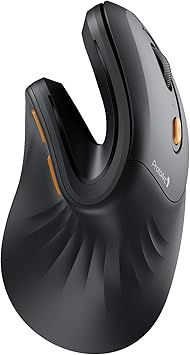
ProtoArc EM11
If you bounce between a laptop, tablet and a desktop, this is the sort of mouse that makes that juggling feel effortless. The ProtoArc EM11 pairs with up to three devices via Bluetooth or the 2.4 GHz dongle, so you can tap between screens without re-pairing.
The vertical shape gives your wrist a more natural posture during long work sessions, and adjustable DPI means you can go from precise photo edits to quick web browsing without missing a beat. It’s rechargeable, the clicks are quiet, and setup is straightforward — perfect for daily tasks, long spreadsheets, or when you’re switching between devices during client calls.
If you want a budget-friendly option that actually behaves like a multi-device tool, this is a solid pick.
What People Say
Users often highlight how easy it is to switch between devices and how the vertical design eases wrist strain. Many call out the quiet clicks and adjustable DPI as practical touches that improve day-to-day comfort and productivity.
Overall Sentiment: Positive

🗣️ Sara_WFH
Paired it with my laptop and tablet and switching is instant — I use the BT for my tablet and the dongle for my desktop. Battery lasts several days of heavy use, and the vertical design really cut down wrist soreness during long work sessions.
🗣️ TechMike
Quiet clicks and snappy tracking. Adjustable DPI is handy when I switch from browsing to editing screenshots. Setup was quick and the mouse feels solid for the price.
Ease Of Use
| Feature | Ease Level |
|---|---|
| Initial Setup | Easy |
| Switching Between Devices | Easy |
| DPI Adjustment | Easy |
| Charging | Easy |
| Button Layout | Moderate |
Comfort
Comfortable for long stretches — the vertical profile supports a more natural wrist position and reduces twisting.
Problem Solving Ability
Solves multi-device workflow friction and reduces wrist pronation-related discomfort for users who switch screens frequently.
Key Benefits
- Pair up to three devices via dual Bluetooth 5.0 and 2.4 GHz USB dongle
- Rechargeable battery with reliable day-to-day endurance
- Vertical ergonomic shape reduces wrist pronation during long use
- Adjustable DPI for quick switching between precision and speed
- Quiet clicks keep noise down during calls or shared workspaces
Current Price: AED 62.00
Rating: 4.4 out of 5 (total: 3,342+)
💰 Best Budget Pick
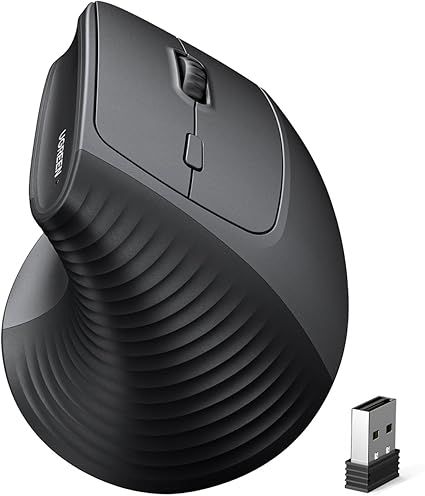
UGREEN Vertical
If you want an ergonomic mouse without stretching your budget, this UGREEN vertical mouse is a straightforward choice. Its handshake-style angle helps keep your wrist in a more natural position during long stretches of email, spreadsheets or Zoom calls, and the six buttons make browser navigation and simple shortcuts feel quicker. The 2.4 GHz connection is reliable for everyday use and the adjustable DPI up to 1600 gives you enough precision for photo tweaks or casual editing.
It’s not trying to be a pro peripheral — it’s a sensible, comfy upgrade for daily work and the occasional focused task.
What People Say
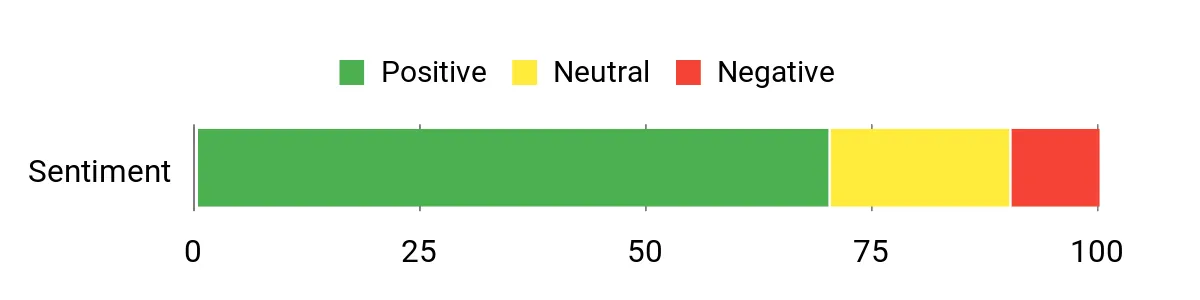
Customers commonly mention that the vertical shape reduces wrist discomfort and that the extra buttons make day-to-day navigation faster. Many appreciate the value for money and the reliable 2.4 GHz connection for work-from-home setups.
Overall Sentiment: Positive
🗣️ Lina_WFH
The 2.4 GHz dongle gives a stable connection to my laptop and desktop, and the vertical shape noticeably eased my wrist discomfort after a few days of use. The extra buttons are handy for back/forward when browsing.
🗣️ PaulRemote
Adjustable DPI up to 1600 is plenty for my workflow — I can switch from precise image tweaks to general browsing without fuss. For the price, it feels solid and comfortable for long work sessions.
Ease Of Use
| Feature | Ease Level |
|---|---|
| Initial Setup | Easy |
| Wireless Pairing (2.4 GHz) | Easy |
| DPI Adjustment | Easy |
| Button Layout | Moderate |
| Battery/Power | Easy |
Comfort
Comfortable for long stretches — the vertical profile promotes a more natural wrist position and reduces twisting, especially compared with flat mice.
Problem Solving Ability
Helps reduce wrist pronation-related discomfort for budget-conscious users and adds convenient extra buttons for smoother browsing and light productivity tasks.
Key Benefits
- Vertical grip reduces wrist pronation and eases long-session strain
- Stable 2.4 GHz wireless connection for laptops and desktops
- Adjustable DPI up to 1600 for a balance of precision and speed
- Six buttons speed up navigation and basic shortcuts
- Very budget-friendly way to try an ergonomic layout
Current Price: AED 63.90
Rating: 4.2 out of 5 (total: +)
⭐ Best For Customization
Logitech Lift
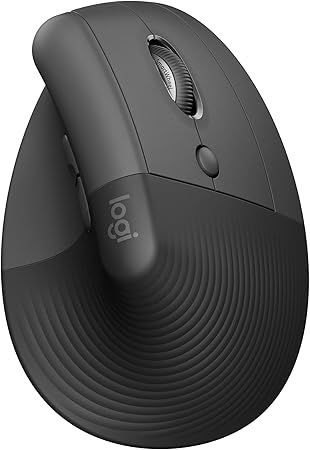
The Logitech Lift is a compact vertical mouse that makes long workdays feel a bit gentler on your wrist. The 57° tilt nudges your hand into a more natural position, so you end up with less pronation and fewer reminders to ‘adjust your posture.’ It’s got quiet clicks for shared spaces, a SmartWheel that scrolls smoothly through long docs, and four buttons you can remap to suit how you work.
Use it day to day for email, spreadsheets and browsing, or bring it into focused sessions where you need precise scrolling and a comfy grip. If you like tinkering, the customization options make it easy to set up shortcuts that actually speed up your workflow — worth considering if you care about comfort and a few productivity tweaks.
What People Say
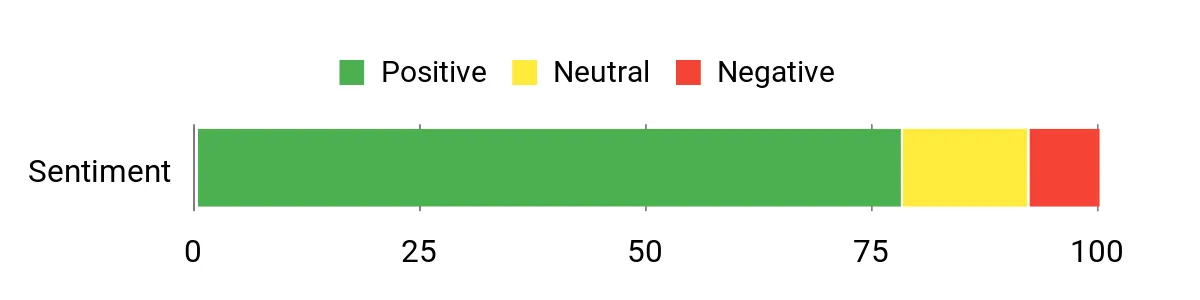
Users frequently praise the Lift for easing wrist discomfort and for its quiet operation. Many call out the remappable buttons and smooth scrolling as practical improvements that fit into daily work without a steep learning curve.
Overall Sentiment: Positive
🗣️ Sami_Remote
Switched to the Lift after wrist soreness from a flat mouse. The vertical angle really helped within a few days, and the clicks are impressively quiet during video calls. The SmartWheel makes scrolling through long spreadsheets so much smoother.
🗣️ TechieAlex
I use it on both my laptop and desktop via Bluetooth and Logi Bolt. Pairing was straightforward and the four remappable buttons have become my go-to shortcuts. Feels solid and comfortable for afternoon editing sessions.
Ease Of Use
| Feature | Ease Level |
|---|---|
| Initial Setup | Easy |
| Wireless Pairing (Bluetooth) | Easy |
| Wireless Pairing (Logi Bolt) | Moderate |
| Button Customization | Moderate |
| SmartWheel Scrolling | Easy |
Comfort
Designed to promote a more natural hand position, the Lift reduces twisting and feels comfortable for long stretches. The compact profile suits many users who want relief without a bulky peripheral.
Problem Solving Ability
Addresses wrist pronation-related discomfort while giving you remappable buttons and better scrolling — helpful if you need both pain relief and small productivity gains.
Key Benefits
- 57° vertical angle to reduce wrist pronation and strain
- Quiet clicks suitable for shared home-office environments
- Four customizable buttons for faster shortcuts and workflows
- SmartWheel for smooth, precise scrolling in long documents
- Bluetooth or Logi Bolt USB connectivity across many OSes
Current Price: AED 189.00
Rating: 4.4 out of 5 (total: 8,176+)
FAQ
How Do I Choose The Right Ergonomic Mouse For Me?
You want a mouse that matches your hand size, typical tasks, and how many devices you switch between. Pay attention to shape and angle first: the Logitech MX Vertical (AED 297.00) and Logitech Lift (AED 189.00) use a 57° natural handshake position that reduces forearm pronation, while the ProtoArc (AED 62.00) and UGREEN (AED 63.90) offer more budget-friendly vertical shapes.
Check adjustable DPI if you do precision work (the MX Vertical goes up to 4000 DPI), and look at connectivity — Bluetooth, 2.4 GHz dongle, or multi-device pairing — if you use a laptop and desktop. Battery and charging matter: the MX Vertical supports fast USB-C charging, which is handy if you hate swapping batteries. Finally, consider extra buttons, software customization, and whether the mouse is designed for your dominant hand; trying one for a week can quickly tell you if the size and grip work for you.
Will Switching To A Vertical Mouse Reduce My Wrist Pain?
You’ll often feel less wrist strain because vertical mice encourage a more neutral forearm position, but it’s not an instant cure. Many people notice improvement in days to weeks, and others need additional changes like adjusting desk height, chair position, or keyboard placement.
Try for at least 1–2 weeks while paying attention to posture and taking regular breaks; if pain persists, consult a healthcare professional. Also know that vertical mice can change how you handle fine pointer movements, so allow a short adaptation period and tweak DPI and pointer speed so your arm — not wrist — does the small movements.
How Do I Set Up And Get The Most Out Of These Ergonomic Mice?
You set up most of these mice by pairing via Bluetooth or plugging in the 2.4 GHz USB receiver, then adjusting pointer speed and DPI in your OS or the vendor app. For Logitech models install Logi Options+ to customize buttons and scrolling, keep firmware updated for reliability, and use the mouse’s built-in switching if you want to pair with multiple devices. Charge rechargeable models regularly and turn them off when not in use to save battery life; for battery-powered units carry a spare AAA if the design requires it. Position the mouse so your forearm is supported, avoid overgripping, and clean the sensor and buttons occasionally to maintain smooth tracking and long-term performance.
Customer Favorites
When choosing between the Logitech MX Vertical, ProtoArc EM11, and UGREEN Vertical, you typically prioritize how much each one reduces wrist strain and how natural the grip feels for your hand size. You also weigh sensor precision, battery life and connectivity, software customization and build quality—opting for the MX Vertical if you want premium ergonomics and polished software, or the ProtoArc and UGREEN if you want solid comfort and features at a friendlier price.
Wrapping Up
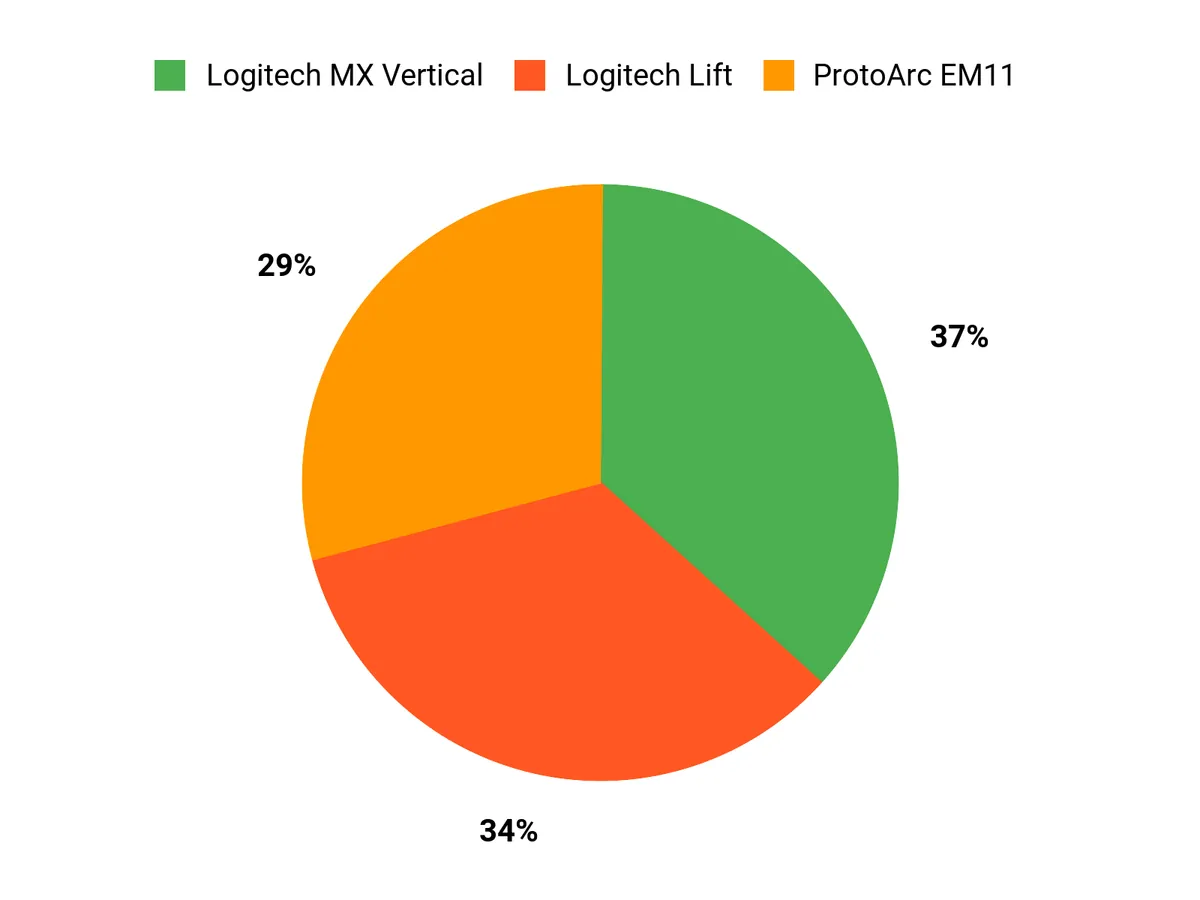
Choosing the right ergonomic mouse can help you work longer with less fatigue and fewer aches. If you want the most pronounced wrist relief and premium tracking, the Logitech MX Vertical is the top choice. For juggling multiple devices without breaking the bank, the ProtoArc EM11 gives reliable multi-device switching. If budget is your priority, the UGREEN Vertical delivers ergonomic benefits at a low price.
And if you value customizable buttons and smooth scrolling, the Logitech Lift is a strong middle-ground option. Pick the one that matches your hand, workflow and device mix to make your WFH setup noticeably more comfortable.
| Product | Image | Rating | Price | Connectivity | DPI Range | Custom Buttons |
|---|---|---|---|---|---|---|
| Logitech MX Vertical Ergonomic Wireless Mouse |
|
4.4/5 (12,580 reviews) | AED 297.00 |
|
4000 | N/A |
| ProtoArc Ergonomic Mouse EM11 NL |
|
4.4/5 (3,342 reviews) | AED 62.00 |
|
Adjustable | N/A |
| UGREEN Ergonomic Vertical Mouse |
|
4.2/5 (N/A) | AED 63.90 |
|
Up to 1600 | 6 |
| Logitech Lift Vertical Ergonomic Mouse |
|
4.4/5 (8,176 reviews) | AED 189.00 |
|
N/A | 4 |
This website provides honest product reviews based on research, testing, and user feedback. We may earn affiliate commissions from purchases made through our links. All product names, logos, and brands are property of their respective owners.